Export a Shopify Collection to Excel from Your Browser
Select the collection you need, preview its products, and download a catalog workbook without confusing a category with the whole store.
You need the rainwear collection for a supplier review, not every product in the store. A whole-store export gives you extra cleanup before you can start comparing the items that matter.
Catalog Prep lets you choose a public collection directly in its Chrome popup. You can capture the current collection or select another discovered one, then download Excel and CSV files with the returned variant details.
Open the collection you want to inspect
Install the extension, open the public Shopify collection page, and click the toolbar icon while that storefront tab is active.
The popup separates Whole website, Current collection, and Current product when the page supports them. Choose the collection action rather than the website action for a category-specific file.
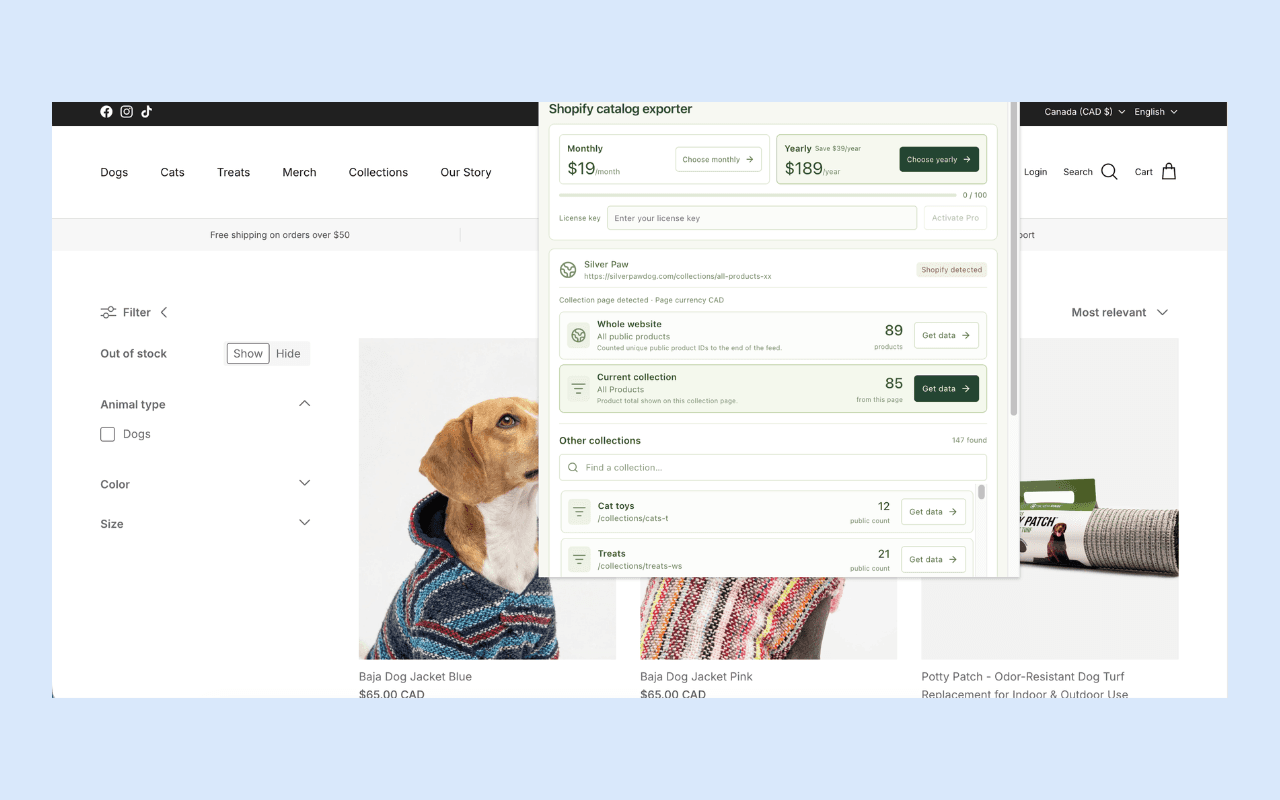
The screenshot comes from the extension's published listing. Counts reflect that captured view; they are not a promise about a store's current contents.
Find another collection without changing pages
Expand or scroll to Other collections. Search the discovered titles or handles, then choose Get data beside the desired collection.
Collection discovery is bounded. A search filters the discovered list; it does not establish that every collection in the merchant's complete catalog is available. Unknown counts remain unknown, and a + indicates a lower bound from an incomplete count.
If a known collection is absent from discovery, open its supported public URL directly and inspect the current-collection choice. A private or unexposed collection remains outside the public workflow.
Keep capture open, then inspect a few products
Leave the popup open while collection runs. Expand Preview captured products and compare a handful of titles, options, tags, and identifiers with the source.
The result should name the collection you selected. Its source context belongs in the exported file and manifest too. If you selected another collection from the popup, the current page's count should not become the expected count for that different scope.
Download the result before beginning another capture on the same active page. If interrupted, reopen the popup there and resume the saved capture when available.
Open the Excel file from the ZIP
Choose Download catalog ZIP, extract it, and open catalog.xlsx. The workbook keeps catalog fields as text to preserve literal values and identifiers during review. The archive also includes CSV, image links, normalized JSON, and the coverage manifest.
The catalog table has one row per returned variant. To count products, use distinct product IDs. To inspect options, keep the variant IDs and their parent-product associations.
| Review task | Spreadsheet approach |
|---|---|
| Count products | Count distinct product identities |
| Check size/color choices | Review variants within each product |
| Review category coverage | Compare the selected scope and manifest |
| Compare prices | Preserve source amount, currency status, and date |
| Review assets | Use image associations and gallery links |
The data-quality guide explains how to preserve these relationships when cleaning the sheet.
Avoid three common collection-count mistakes
Adding every collection total. Products can appear in several collections. Sum the totals only if your analysis intentionally counts memberships; it will not generally give a unique store-product count.
Treating "All Products" as a guaranteed whole-store scope. It is a collection name. Compare the actual requested endpoints and identities before assuming it contains every exposed product.
Expecting a page filter to define the export. A visible filtered subtotal can differ from the underlying collection feed. Inspect the chosen scope and perform any permitted analysis filtering explicitly after export.
Work within the visible limits
Free includes 100 captured products per UTC month in the browser profile. All extension runs retain bounds of 500 products and 2,500 variants; larger captures can be partial. Pro removes the monthly quota while retaining those run bounds. Check the current listing before planning a larger job.
For multiple supplied URLs or a scheduled workflow, the Apify export tutorial covers the companion actor. Its limits, pricing, and files are separate from the extension.
Open Catalog Prep in the Chrome Web Store, choose one useful collection, and compare its Excel rows with the source. You can keep the research focused from the first capture.