Meet Catalog Prep: Export Shopify Catalogs from Chrome
Turn a public Shopify store or collection into CSV and Excel files with variants, tags, image links, and a report showing what was captured.
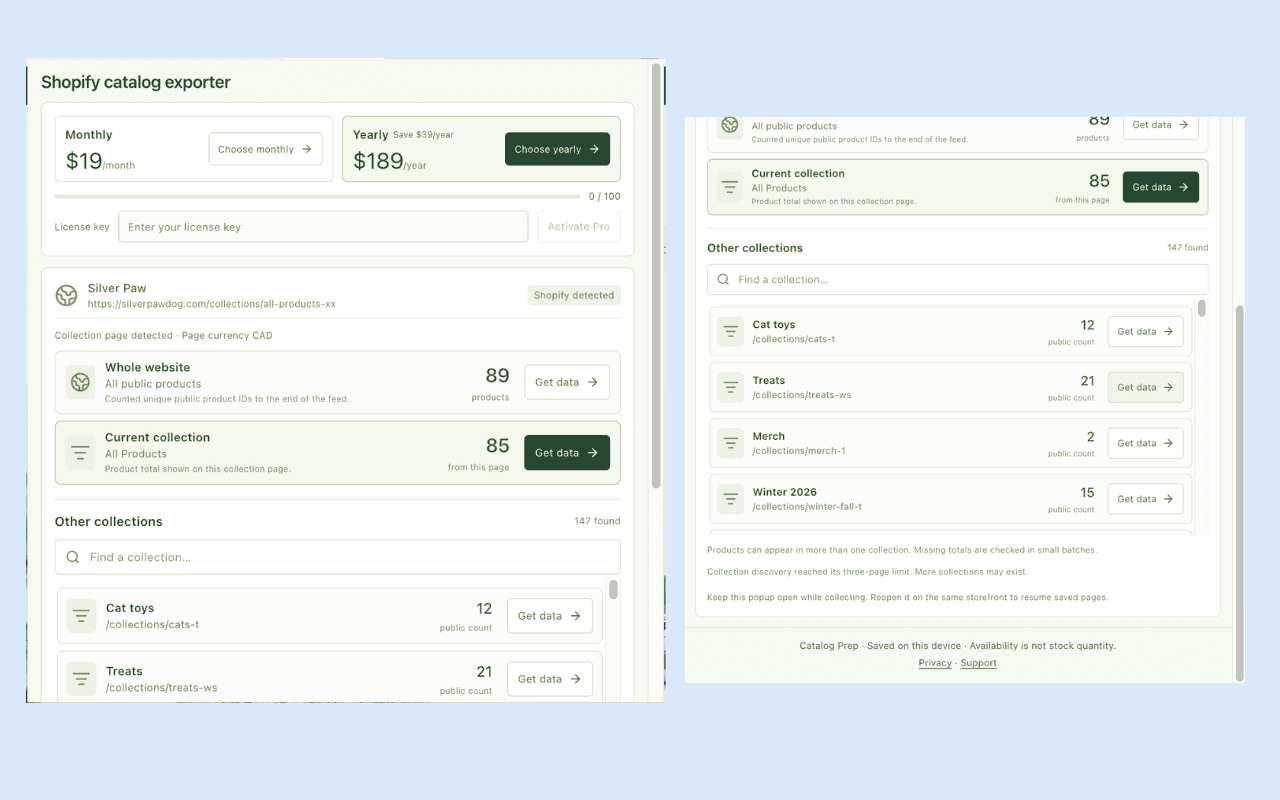
You need a supplier's product catalog in a spreadsheet. The storefront has sizes, colors, prices, and images, but copying them one product at a time would take the afternoon.
I built Catalog Prep — Shopify Catalog Exporter to bring that work into Chrome. Open a public Shopify storefront, choose the store, collection, or product you want, then capture and download the exposed catalog data.
The first useful result is a file you can inspect: product and variant identities, original values, image references, and a coverage report explaining the capture.
Go from storefront to spreadsheet
Install Catalog Prep from the Chrome Web Store and pin it to the toolbar. Open the public storefront you want to review, then click the extension while that tab is active.
The popup identifies the current page and shows separate choices for Whole website, Current collection, and Current product, where available. A searchable Other collections list helps you choose another discovered category without leaving the page.
- Choose a small scope for your first export.
- Click Get data beside that scope.
- Keep the popup open while it captures.
- Expand Preview captured products to inspect the result.
- Use Download exact CSV or Download catalog ZIP.
Download a capture before starting another on the same active page. The latest capture replaces the previous saved result for that page. If you interrupt collection, reopen the popup on the same storefront and use Resume capture to continue saved progress.
Choose the file that fits the work
The ZIP keeps several useful views together:
| File | What it gives you |
|---|---|
catalog.csv | One row per returned variant, with product context |
catalog.xlsx | Catalog values typed as text for spreadsheet inspection |
images.csv | Captured image URLs and product associations |
observed-catalog.json | Structured product and variant records |
manifest.json | Source scope, counts, observation context, and coverage |
Use Excel when you want to inspect identifiers and source text without automatic type conversion. Use JSON when preserving relationships matters. Image exports contain links and metadata; they do not download the image files themselves.
Keep the fields that make catalog work possible
Catalog Prep captures exposed titles, descriptions, product and variant IDs, SKUs, tags, option values, prices, availability, timestamps, and image links. Available galleries and variant associations help keep the export useful beyond a list of product titles.
A jacket with three sizes should remain one product with three variant identities. A missing SKU should remain a missing value. A repeated SKU should not cause a different variant to disappear.
That is why I treat identity, source values, and coverage as part of the product. The SKU and variant guide explains how to inspect those details in a worksheet.
Understand the count before expanding the run
The website count and a collection count describe different scopes. A collection named "All Products" can still differ from the public whole-store feed. Products can also appear in multiple collections, so adding collection totals can count the same product repeatedly.
Unknown totals remain unknown. A lower-bound count is labeled with +, and partial or blocked captures remain labeled in the result. The collection export guide walks through scope selection.
Every extension run has operational bounds of 500 products and 2,500 variants. Larger catalogs can be partial. Check the manifest before treating a download as complete.
Start free, then choose a plan for repeated work
The current Chrome Web Store listing offers:
| Plan | Product allowance |
|---|---|
| Free | 100 captured products per UTC calendar month in the browser profile |
| Pro Monthly | USD $19/month; no monthly product quota |
| Pro Yearly | USD $189/year; no monthly product quota |
Prices were checked on 29 October 2026, before applicable taxes or checkout currency conversion. All plans retain the per-run operational bounds. Variants do not consume extra product units, and downloading a saved capture again does not use more allowance. Starting a new capture counts its products again.
Catalog records stay on your device
Collection and saved files stay in your browser and chosen download location. Optional Pro checkout and licensing use Dodo Payments. No Shopify Admin account is required. The privacy policy explains what goes to the storefront and licensing provider.
Catalog Prep preserves observed prices without currency conversion. Public availability is not inventory quantity, and catalog records do not establish sales or revenue. The extension works on supported public sources and does not provide background monitoring or access to unpublished products.
Need an API instead?
The companion Shopify Product Scraper on Apify is available for supplied URLs, API calls, and saved tasks. It has its own limits, pricing, and output structure. Use the browser-versus-actor guide to choose between them.
For a catalog in front of you, install Catalog Prep. Capture one collection, preview a few products, and open the Excel file beside the source. You can evaluate the result on the task you actually need to finish.