Why I Built Catalog Prep: The Download Is Only the Beginning
Why I built a Shopify exporter around the work after downloading: checking variant identities, preserving SKUs and understanding catalog coverage.
You have a supplier's Shopify store open and a spreadsheet waiting for its products. You run an exporter, download the file, and start checking the rows.
Now the work you hoped to avoid begins. Which collection did it capture? Are all the returned sizes there? Did Excel change the SKUs? What does the product count actually count?
I wasn’t happy with the output I was getting from existing Shopify export tools. I built Catalog Prep around that handoff: give the person opening the file enough information to use it and check it.
Here is the first workflow I would use to evaluate it.
Start with the collection you already need
Choose a small public collection that matters to your actual task. If you are reviewing rainwear, begin with rainwear. A whole-store download gives you more rows to sort before you have learned whether the file meets your needs.
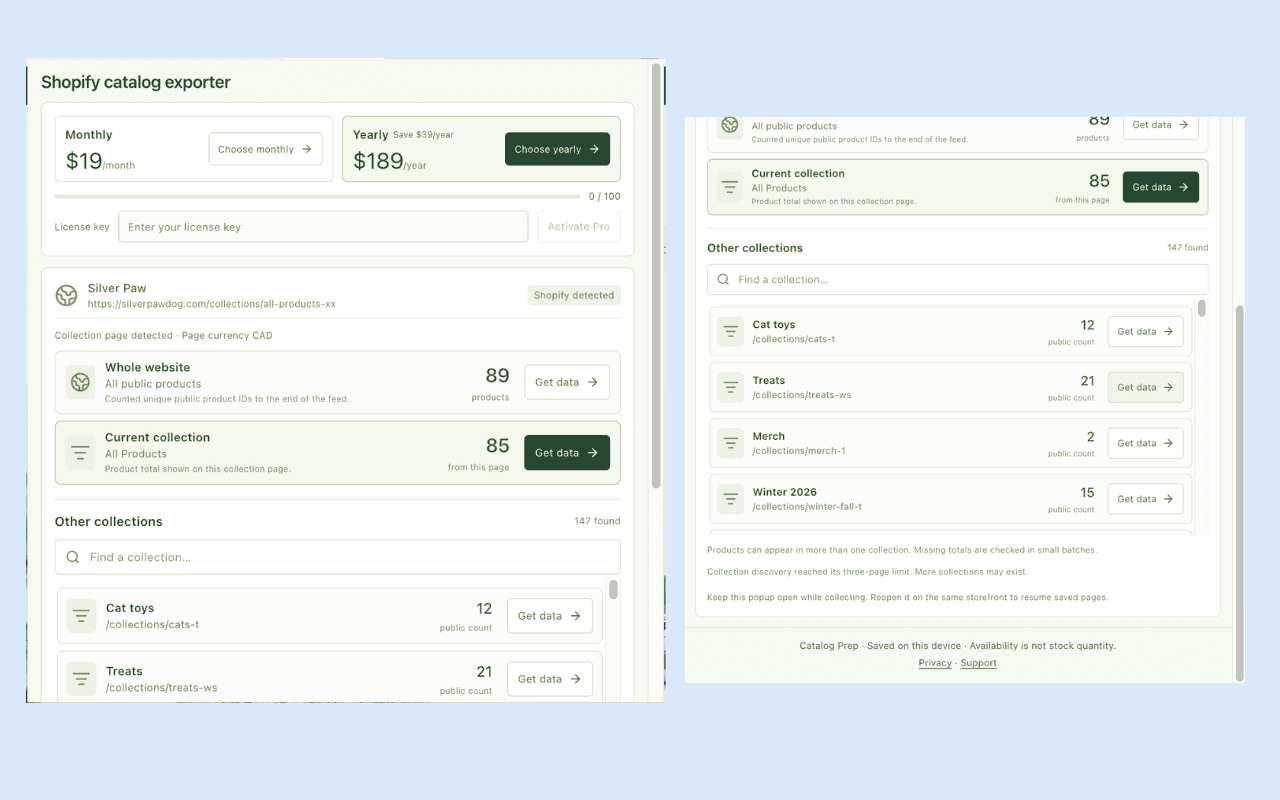
Install Catalog Prep in Chrome, pin it, and open the storefront. Click the extension while that tab is active. The popup separates the website, current collection, and current product where available. It also lets you search other discovered collections.
Choose the relevant Get data action and keep the popup open while capture runs. Preview several products before downloading the catalog ZIP.
The ZIP gives you an Excel workbook, exact CSV, an image-link table, normalized JSON, and a manifest describing the capture. You can work from the file format that fits your task while keeping the source context beside it.
Check one awkward product
Pick a product with several sizes or colors. Compare its product and variant identities with the exported rows. Check the SKUs, options, tags, and image references that the source exposes.
This is where an exporter earns its place in your workflow.
In a retained check of Silver Paw's public feed on 28 October 2026, the source contained 89 products, 267 variants, and 264 distinct nonempty SKUs. Treating SKU as the unique row identity could lose valid variants. Missing or reused SKUs do not make their products disappear.
Catalog Prep retains product and variant identities, keeps missing values unknown, and flags reused SKUs. Its text-typed Excel file also helps preserve literal values when you open the workbook.
The dated figures describe that public-feed snapshot. They do not establish today's catalog size or a competing tool's result. The useful lesson is the check: count identities before “cleaning” a supplier file.
Read the scope beside the count
The count investigation found 89 products in the public whole-store feed and 85 in a collection called “All Products.” Both numbers described different requested scopes.
That is why Catalog Prep shows separate choices and keeps source scope in its files. Products can appear in several collections, so adding collection totals can also count the same item more than once.
If a capture is partial or blocked, that qualification belongs with the data. Open the manifest before treating a download as the complete public catalog. The collection walkthrough explains the scope choices.
Use the Free plan to test your own task
The published listing includes 100 captured products per UTC calendar month in the browser profile. Pro is USD $19/month or $189/year, before applicable taxes or checkout conversion, as checked on 31 October 2026.
Pro removes the monthly product quota and has no fixed product or variant cap per run. Free captures use the remaining monthly allowance. Capture can continue to the end of a supported public feed, subject to browser memory, storage and source access; full-store coverage is not guaranteed. Re-downloading a saved capture does not use more allowance; beginning a new capture counts its products again.
Download a result before starting another scope on the same active page. If collection is interrupted, reopen the popup there and use saved recovery when available.
Know what you are taking away
Catalog records stay on your device. Dodo Payments handles optional Pro checkout and licensing; the privacy policy explains the boundary.
Images are exported as links, not downloaded binaries. Prices retain their observed values without conversion. Public availability does not establish stock quantity or sales. A source export still needs mapping and review before destination import.
If the task becomes a supplied URL list or a scheduled integration, the companion Apify actor has its own operating model and billing.
For the collection in front of you, try Catalog Prep. Open its Excel file beside the storefront and check the awkward product first. That gives you a much better reason to keep an exporter than a successful download notification.