Catalog Prep · Chrome extension
Your Shopify catalog.
Ready for a spreadsheet.
Turn a public Shopify store, collection, or product into CSV and Excel files. Keep variants, SKUs, tags, prices, and image links together, then see exactly what was captured.
Start free: 100 captured products / month. No Shopify Admin access needed.
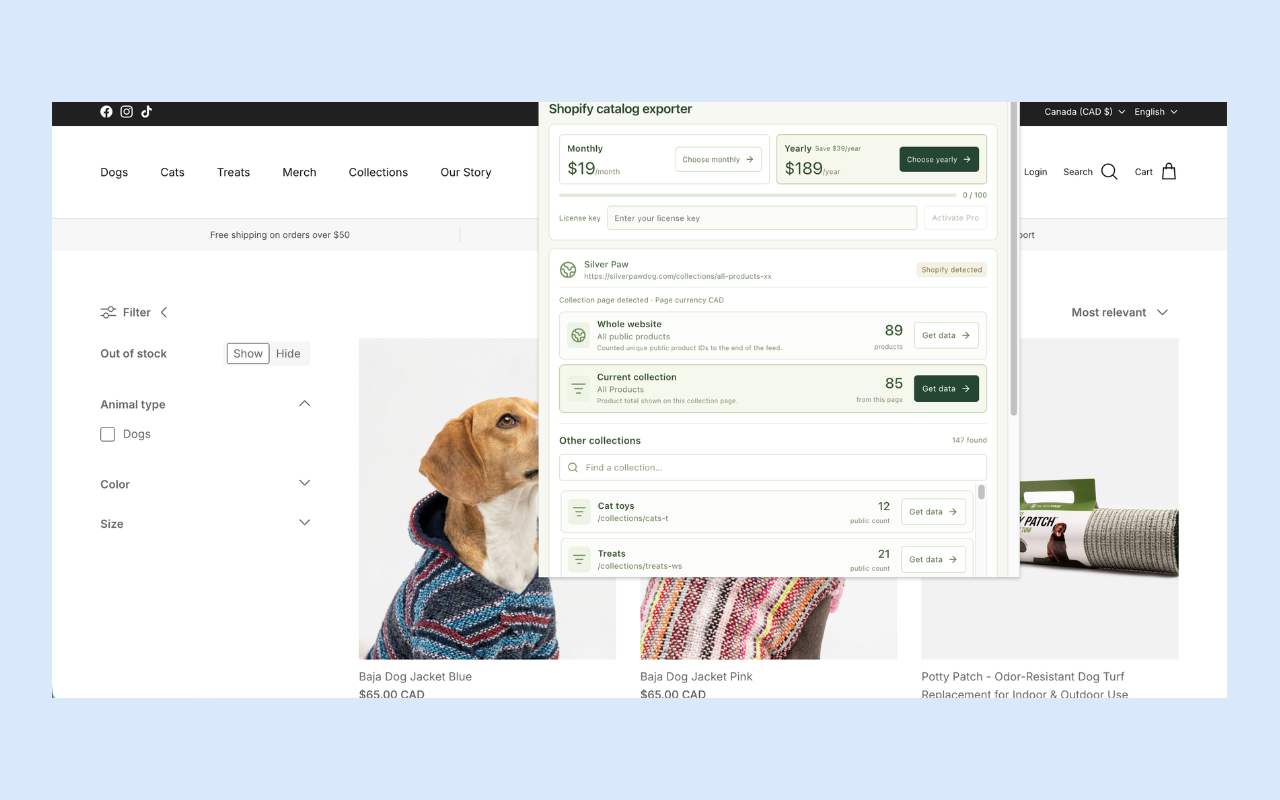
- CSV + Excel + JSON
- Catalog records stay on your device
- Coverage included with every ZIP
01 / Capture
The details that make a catalog useful.
Prepare supplier catalogs, review public product ranges, or build a dataset for your next merchandising task.
Choose your scope
Capture the public website, current collection, or current product where available. Search discovered collections to find the category you need.
Keep variants together
Export returned product and variant IDs, SKUs, sizes, colors, and other option values with their product context.
Preserve source values
Review observed prices, tags, descriptions, and public availability. Missing values stay unknown; prices are never converted.
Review coverage
Separate scope counts and a coverage manifest help you understand what was captured. Partial and blocked results are labeled.
Preview before downloading
Inspect captured products inside the popup before choosing a CSV or downloading the complete catalog ZIP.
Keep catalog records local
Captured catalog records stay on your device. No Shopify Admin account or API key is required.
Choose your scope
One collection or the public store.
The whole-website count and the current-collection count describe different sources. Choose the scope that matches your task before collecting.
Search the discovered collections without leaving the storefront. Products may appear in more than one collection, so collection totals should not be added together as unique products.
Read the collection export guide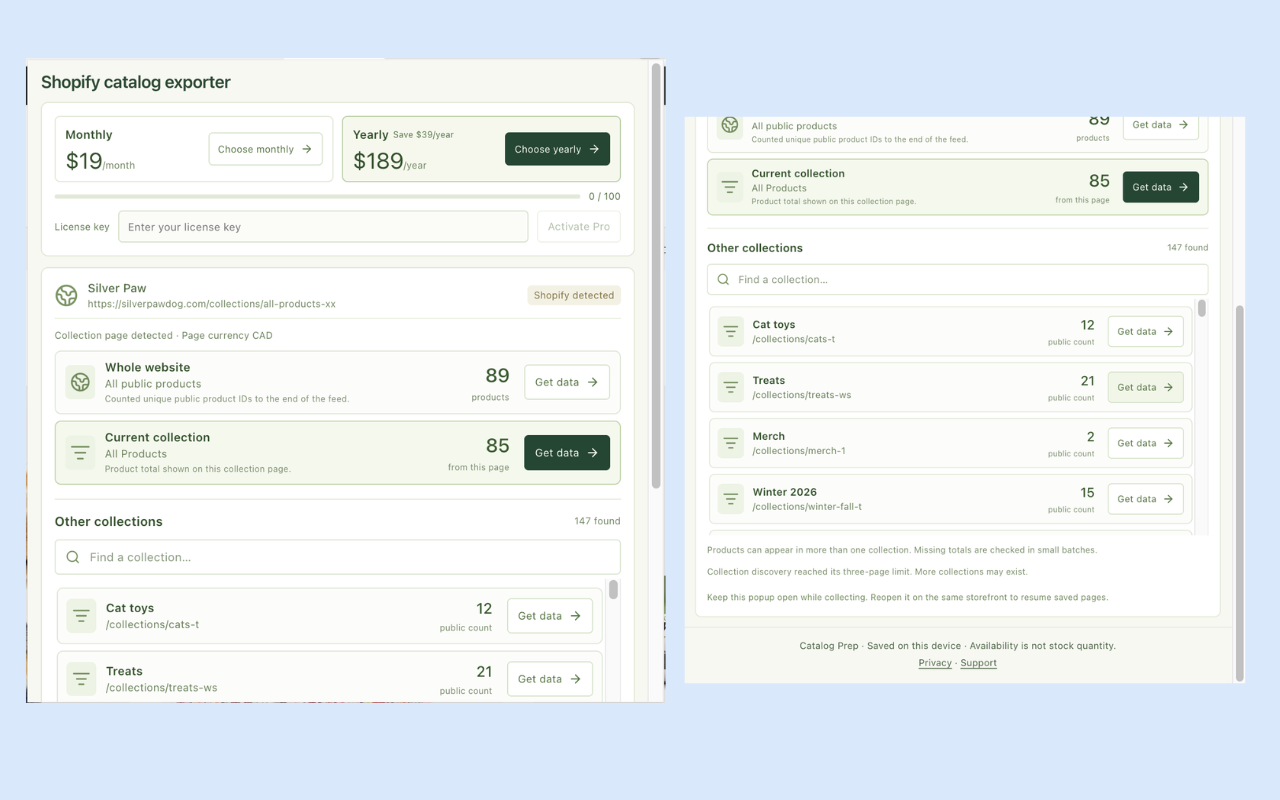
02 / Export
A catalog you can inspect and work with.
Download a CSV on its own, or keep the workbook, image references, structured records, and capture report together in one ZIP.
| File | What you get |
|---|---|
| catalog.csv | A spreadsheet-friendly export with one row per returned variant and its product context. |
| catalog.xlsx | An Excel workbook with catalog values stored as text to preserve literal IDs and SKUs. |
| images.csv | Captured image links and their product associations, ready for review. |
| observed-catalog.json | Structured product and variant records for processing outside a spreadsheet. |
| manifest.json | Source scope, counts, observation context, and coverage for the capture. |
Supported catalog data
- Products
- Exposed product IDs, titles, descriptions, and tags
- Variants & options
- Variant IDs, SKUs, option names, and option values
- Pricing
- Observed prices and store currency when detectable from public metadata
- Availability
- Public availability signals; actual stock quantities are not provided
- Images
- Image URLs and captured product / variant associations
- Context
- Available timestamps, source scope, capture counts, and coverage
Fields depend on what the public storefront exposes. Image exports contain links, not image files. Source prices are preserved; missing data and unknown currency stay unknown.
03 / Workflow
From storefront to file in four steps.
- 1
Open a Shopify storefront
Install Catalog Prep, pin it in Chrome, and open the public store you want to review.
- 2
Choose a store, collection, or product
Open the popup and click Get data beside your chosen scope. Start with a small collection.
- 3
Capture and inspect
Keep the popup open during collection. Expand Preview captured products to review the result.
- 4
Download your catalog
Choose Download exact CSV or Download catalog ZIP. Check the manifest before treating a capture as complete.
Keep the popup open while capturing. If interrupted, reopen it on the same storefront to resume saved progress. Download your capture before starting another on the same active page.
04 / Plans
Start with a collection. Grow from there.
Try the free allowance before choosing a plan for repeated catalog work.
Free
$0to get started
100 captured products / month
For a first collection or occasional catalog review.
Pro Monthly
$19/ month
No monthly product quota
For regular sourcing and catalog preparation.
Pro Yearly
$189/ year
No monthly product quota
Save $39 a year compared with monthly billing.
All plans: up to 500 products and 2,500 variants per run. Pro removes the monthly product quota; per-run bounds still apply. Larger catalogs may be partial.
The Free allowance resets each UTC calendar month in the browser profile. Variants and repeat downloads of a saved capture do not consume extra product allowance. A new capture counts its products again.
Prices in USD, checked October 29, 2026, before taxes or checkout currency conversion. Paid checkout and license activation are handled by Dodo Payments. See current store terms.
A clear view of the source
Know what your export represents.
Catalog Prep is built for reviewing public catalog data. It preserves observed values and includes coverage context so you can decide what is ready for your next workflow.
- Actual inventory quantities and sales estimates are not provided.
- Image links are exported; image files are not downloaded.
- Full-store coverage depends on source access and run limits.
- Exports need mapping and review before a native Shopify import.
05 / Questions
Before your first export.
Do I need access to Shopify Admin?
No. Catalog Prep works with exposed data from supported public Shopify storefronts. It does not require a Shopify Admin account or Admin API key, and it does not access unpublished products.
Can I export just one collection or product?
Yes, where available. The popup separates whole-website, current-collection, and current-product scopes. You can also search other discovered collections. Website and collection counts can differ, and products may belong to more than one collection.
Does the Excel file preserve SKUs and long IDs?
The workbook stores catalog values as text to preserve literal source values such as leading-zero SKUs and long identifiers. Convert fields deliberately when you need numerical calculations.
Does it download product images?
Exports include image links and available associations, not image files. The ZIP contains an images.csv file so you can review the captured image URLs.
Will it export every product in a store?
Full-store coverage is not guaranteed. Each run is bounded at 500 products and 2,500 variants on every plan. Source restrictions, blocked requests, and larger catalogs can produce partial results. Review the coverage manifest.
How does the free allowance work?
Free includes 100 captured products per UTC calendar month in the browser profile. Variants do not consume additional product units, and downloading a saved capture again does not use more allowance. A new capture counts its products again.
Can I close the popup while collecting?
Keep the popup open while capture runs. If interrupted, reopen it on the same storefront to restore completed pages and resume saved progress. Download a capture before starting another on the same active page, as the latest capture replaces the previous saved result for that page.
Is the export ready to import into another Shopify store?
Catalog Prep exports observed source data for review and preparation. It does not automatically produce a native Shopify import file. Map fields to your destination requirements and check your right to reuse the content before importing.
Does availability mean stock quantity or sales?
No. Public availability is not actual inventory quantity. Catalog Prep does not provide stock counts, sales or revenue estimates, or background monitoring. Currency is detected when possible, and observed prices are preserved without conversion.
Where is my catalog data stored?
Catalog records remain on your device and in your chosen downloads. Optional paid purchases and license activation use Dodo Payments. See the privacy policy for details on storefront requests and licensing.
Comparing catalog exporters?
Compare scope, file formats, image handling, and coverage against your actual task.
Catalog Prep vs Shopify Spy & Koala InspectorNeed an API workflow?
The companion Apify actor supports supplied URLs, API calls, and saved tasks, with its own pricing and limits.
Explore the Shopify Product ScraperPut the next catalog to work.
Start with a public collection. Preview the products, download your files, and review the result beside the source.
Add Catalog Prep to Chrome100 captured products / month on Free · Catalog records stay on your device