Shopify Detector & Spy · Chrome extension
Detect Shopify stores.
Export JSON/CSV.
Shopify Detector & Spy is a Chrome extension for identifying Shopify storefronts and researching public product catalogs. Export products, variants, SKUs, prices and image links to CSV or a ZIP with JSON, Excel and coverage information.
Start free: 100 captured products / month. No Shopify Admin access needed.
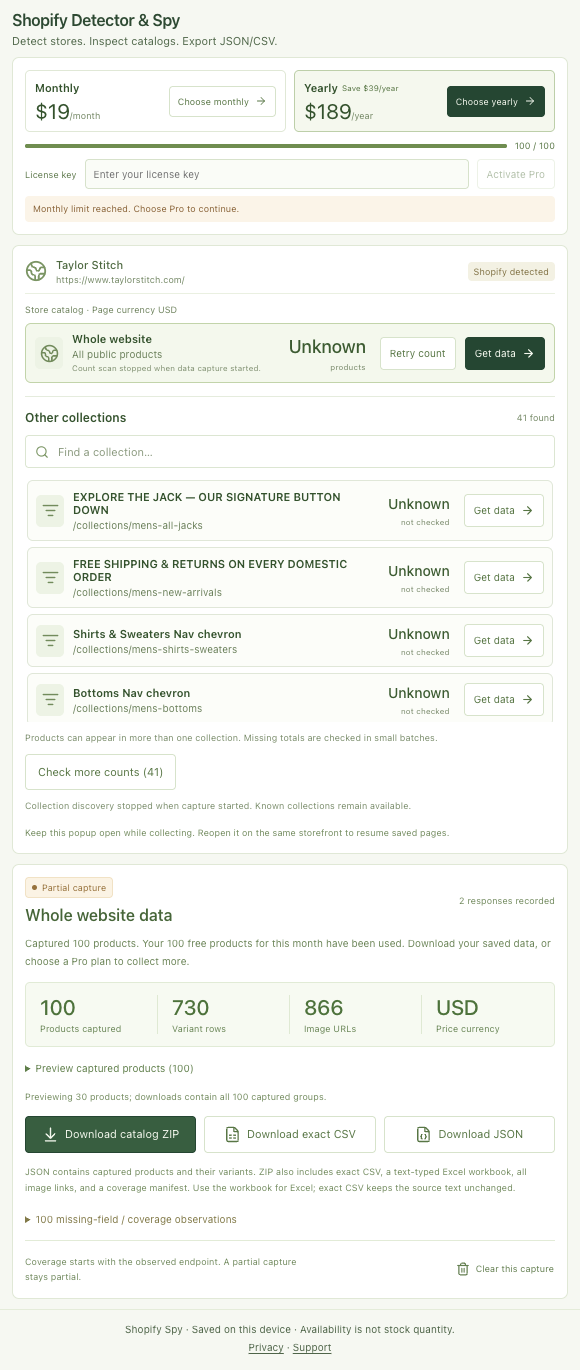
- Direct JSON + CSV; Excel in ZIP
- Catalog records stay on your device
- Coverage included with every ZIP
The new name is live in Chrome Web Store version 1.0.3, checked 1 November 2026. Download the ZIP for JSON. Version 1.0.4 also adds a separate JSON button; check your installed version for that control.
Start with your question
One task. A useful catalog file.
How to tell if a store uses Shopify
Check the platform before collecting product data.
Read the guideExport Shopify products to JSON
Keep products and variants together in a usable data file.
Read the guideChoose one collection for your research
Review the category you need with explicit source scope.
Read the guideCompare Shopify catalog scrapers
Give competing tools the same source and inspect the files.
Read the guideCompare the workflow
Choose Shopify spy tools by the file you need.
Shopify Detector & Spy focuses on public catalog records you can inspect: product and variant relationships, literal source values, image links and a manifest that explains capture coverage.
| Tool | Main job | Files | Workflow |
|---|---|---|---|
| Shopify Detector & Spy | Shopify detection and inspectable public catalog files | CSV; JSON, text-typed Excel and coverage manifest in ZIP | Keep popup open; restore saved progress |
| Shopify Scraper & Parser — Shopify Spy | Product scraping and export | CSV/XLSX and image downloads advertised | Undocked scraping advertised |
| Koala Inspector | Broader store, app/theme and product research | CSV exports advertised | Monitoring and sales/traffic estimates advertised |
Publisher-listing features checked 1 November 2026. These descriptions are not a controlled comparison of export accuracy. Koala’s sales and traffic figures are advertised estimates. Give each tool the same collection and inspect the output.
Use the same-collection comparison guide01 / Capture
The details that make a catalog useful.
Explore public competitor assortments, compare exposed prices and variant options, and build a dataset for your product research.
Detect Shopify storefronts
Check public storefront signals, then choose the website, current collection or product. Search discovered collections to focus competitor product research.
Keep variants together
Export returned product and variant IDs, SKUs, sizes, colors, and other option values with their product context.
Preserve source values
Review observed prices, tags, descriptions, and public availability. Missing values stay unknown; prices are never converted.
Review coverage
Separate scope counts and a coverage manifest help you understand what was captured. Partial and blocked results are labeled.
Preview before downloading
Inspect products in the popup, then download CSV or the ZIP containing JSON, Excel and a coverage manifest. Version 1.0.4 also adds a separate JSON button.
Keep catalog records local
Captured catalog records stay on your device. No Shopify Admin account or API key is required.
Choose your scope
One collection or the public store.
The whole-website count and the current-collection count describe different sources. Choose the scope that matches your task before collecting.
Search the discovered collections without leaving the storefront. Products may appear in more than one collection, so collection totals should not be added together as unique products.
Read the collection export guide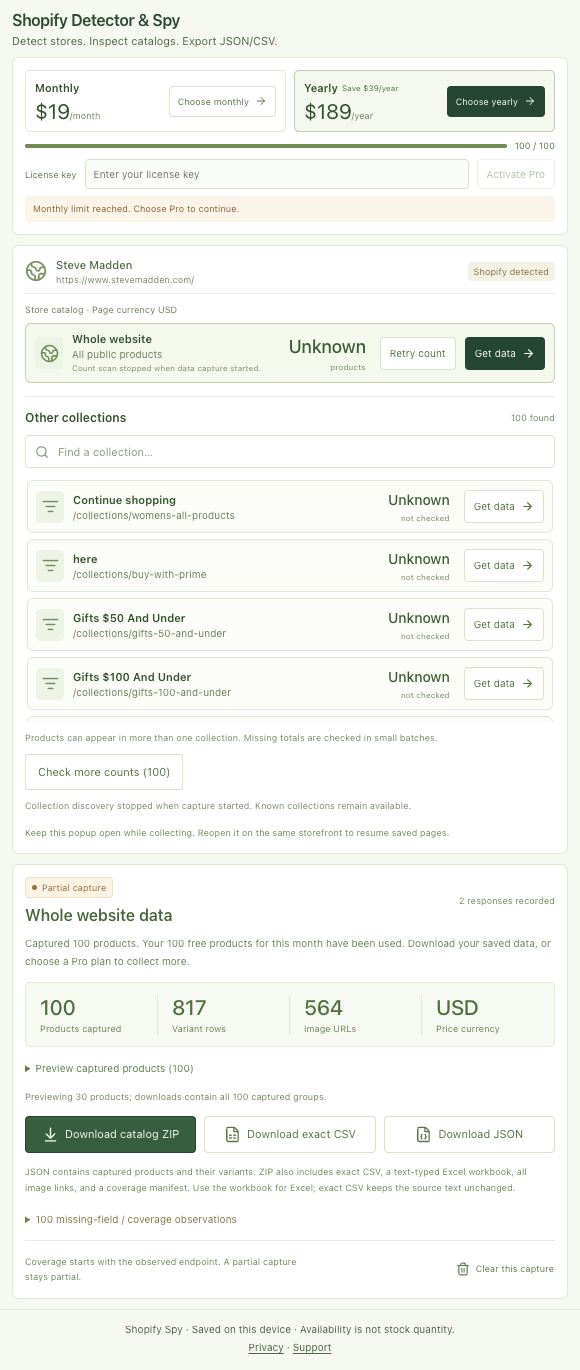
02 / Export
A catalog you can inspect and work with.
Download CSV on its own, or the ZIP for JSON, Excel, image references and a capture report. Version 1.0.4 also adds a separate JSON button.
| File | What you get |
|---|---|
| Direct JSON download (v1.0.4) | The same normalized product array as observed-catalog.json, with nested variants and image links. IDs and prices remain strings. |
| catalog.csv | A spreadsheet-friendly export with one row per returned variant and its product context. |
| catalog.xlsx | An Excel workbook with catalog values stored as text to preserve literal IDs and SKUs. |
| images.csv | Captured image links and their product associations, ready for review. |
| observed-catalog.json | Structured product and variant records for processing outside a spreadsheet. |
| manifest.json | Source scope, counts, observation context, and coverage for the capture. |
Supported catalog data
- Products
- Exposed product IDs, titles, descriptions, and tags
- Variants & options
- Variant IDs, SKUs, option names, and option values
- Pricing
- Observed prices and store currency when detectable from public metadata
- Availability
- Public availability signals; actual stock quantities are not provided
- Images
- Image URLs and captured product / variant associations
- Context
- Available timestamps, source scope, capture counts, and coverage
Fields depend on what the public storefront exposes. Image exports contain links, not image files. Source prices are preserved; missing data and unknown currency stay unknown.
03 / Workflow
From storefront to file in four steps.
- 1
Open a Shopify storefront
Install Shopify Detector & Spy, pin it in Chrome, and open the public store you want to review.
- 2
Choose a store, collection, or product
Open the popup and click Get data beside your chosen scope. Start with a small collection.
- 3
Capture and inspect
Keep the popup open during collection. Expand Preview captured products to review the result.
- 4
Download your catalog
Choose Download exact CSV or Download catalog ZIP for JSON, Excel and coverage information. Version 1.0.4 also has Download JSON.
Keep the popup open while capturing. If interrupted, reopen it on the same storefront to resume saved progress. Download your capture before starting another on the same active page.
04 / Plans
Start with a collection. Grow from there.
Try the free allowance before choosing a plan for repeated catalog work.
Free
$0to get started
100 captured products / UTC calendar month
For a first collection or occasional catalog review.
Pro Monthly
$19/ month
No monthly product quota
For repeated competitor catalog research.
Pro Yearly
$189/ year
No monthly product quota
Save $39 a year compared with monthly billing.
Pro removes the monthly product quota and has no fixed product or variant cap per run. Free captures use the remaining monthly allowance. Browser memory, storage and source access can still limit coverage.
The Free allowance resets each UTC calendar month in the browser profile. Variants and repeat downloads of a saved capture do not consume extra product allowance. A new capture counts its products again.
USD listing prices checked 1 November 2026, before taxes or checkout currency conversion. Paid checkout and license activation are handled by Dodo Payments. See current store terms.
A clear view of the source
Know what your export represents.
Shopify Detector & Spy is built for public competitor catalog research. It preserves observed values and includes coverage context so you can decide what is ready for your next workflow.
- Actual inventory quantities and sales estimates are not provided.
- Image links are exported; image files are not downloaded.
- Full-store coverage depends on source access and browser resources.
- Exports need mapping and review before a native Shopify import.
05 / Questions
Before your first export.
What is Shopify Detector & Spy?
Shopify Detector & Spy is a Chrome extension for identifying Shopify storefront signals and researching public product catalogs. It exports products, variants, SKUs, prices, tags and image links to CSV or a ZIP containing JSON, Excel and coverage information.
How can I tell if a website uses Shopify?
Open the storefront and click the extension to inspect public Shopify signals. A custom domain or headless storefront can hide familiar clues. Detection identifies the platform evidence; it does not guarantee that a public product feed is accessible.
How do I export Shopify products to JSON?
Capture a supported store, collection or product, then choose Download catalog ZIP and extract observed-catalog.json. It contains normalized products with nested variants and image links. Version 1.0.4 also adds a separate Download JSON button; the public listing checked on 1 November shows version 1.0.3.
Is Shopify Detector & Spy free?
Free includes 100 captured products per UTC calendar month in the browser profile. Pro Monthly costs USD $19/month and Pro Yearly costs USD $189/year before taxes or checkout conversion. Pro removes the monthly quota and has no fixed product or variant cap per run; browser resources and source access still affect coverage.
Do I need access to Shopify Admin?
No. The extension works with exposed data from supported public storefronts without a Shopify Admin account or Admin API key. It does not access unpublished or private merchant records.
Can I export just one collection or product?
Yes, where available. The popup separates whole-website, current-collection and current-product scopes. You can also search discovered collections. Collection membership can overlap, so collection totals should not be added together as unique store products.
Does the export preserve variants and literal SKUs?
JSON keeps products and nested variant identities; CSV has one row per returned variant with product context. The Excel workbook stores catalog values as text to preserve literal SKUs and long IDs. Missing source fields stay unknown; prices are not converted.
Does spy mean theme detection, app detection or verified sales?
Here, spy means inspecting public catalog data. The extension does not detect themes or installed apps, estimate sales or revenue, expose stock quantities, download image binaries or monitor stores in the background.
Can I close the popup while collecting?
Keep the popup open while capture runs. Reopening it on the same storefront restores saved completed pages and downloads. Save a capture before starting another scope on the same page.
Where is the catalog data stored?
Captured catalog records stay in your browser profile and chosen download location. Storefront requests go from your browser to the public source. Dodo Payments handles optional Pro checkout and licensing; catalog records are not sent to Dodo.
Comparing catalog exporters?
Compare scope, file formats, image handling, and coverage against your actual task.
Shopify Detector & Spy vs Shopify Spy & Koala InspectorNeed an API workflow?
The companion Apify actor supports supplied URLs, API calls, and saved tasks, with its own pricing and limits.
Explore the Shopify Product ScraperNotes on Shopify Detector & Spy Catalog Scraper - Export to JSON/CSV
Shopify Detector & Spy: Detect Stores and Export JSON/CSV
Detect a Shopify storefront, inspect its public competitor catalog, and download products, variants and prices as JSON or CSV.
How to Tell If a Store Uses Shopify
Check public storefront signals, understand custom domains and headless stores, then decide whether you can collect the catalog you need.
How to Export Public Shopify Products to JSON
Download normalized products with nested variants and image links, preserve literal identifiers, and keep the capture manifest beside the JSON.
Shopify Detector & Spy vs Shopify Spy and Koala Inspector
Compare public catalog research and JSON/CSV exports with Shopify Scraper & Parser and Koala, then inspect the output from the same collection.
Export a Shopify Collection to Excel from Your Browser
Select the collection you need, preview its products, and download a catalog workbook without confusing a category with the whole store.
Is Your Shopify CSV Usable? Check SKUs, Variants, and Images
Use a practical acceptance check for catalog exports: preserve identifiers, reconcile variants, verify image associations, and keep currency evidence.
Shopify Product Exporter Not Working? Check These Six Things
Diagnose empty exports, missing products, interrupted captures, and damaged spreadsheet values before repeating the same run.
Shopify Detector & Spy or Apify: Which Research Workflow Fits?
Use the Chrome extension to detect and inspect a public Shopify catalog, or the separate Apify actor for supplied URLs, API calls and saved tasks.
7 Questions to Ask Before You Trust a Shopify Catalog Export
Check scope, variant identities, SKUs, image links, currency and coverage before handing a Shopify catalog export to someone else.
A Count Endpoint Returned 404. The Store Was Not Empty.
A dated Shopify source audit found 89 products after a count endpoint returned 404. Here is why unknown, zero and partial need different states.
A Merchandiser's Guide to Reviewing a Public Shopify Collection
Turn a public Shopify collection into a focused range review, with source evidence, variant checks and a clear supplier question list.
Why I Built Shopify Detector & Spy for Public Catalog Research
The work starts after spotting a competitor’s Shopify store: inspect the assortment, keep variant identities and take usable JSON or CSV away.
Compare Shopify Catalog Scrapers on the Same Collection
Evaluate Shopify Detector & Spy, Shopify Scraper & Parser and Koala against one public collection and the catalog files your research needs.
Your Shopify CSV Downloaded. Can You Actually Use It?
Check literal SKUs, variant identities, image associations, currency evidence and capture scope before using a Shopify catalog export.
Inspect the next competitor catalog.
Start with a public collection. Preview the products, download your files, and review the result beside the source.
Add Shopify Detector & Spy to Chrome100 captured products / month on Free · Catalog records stay on your device